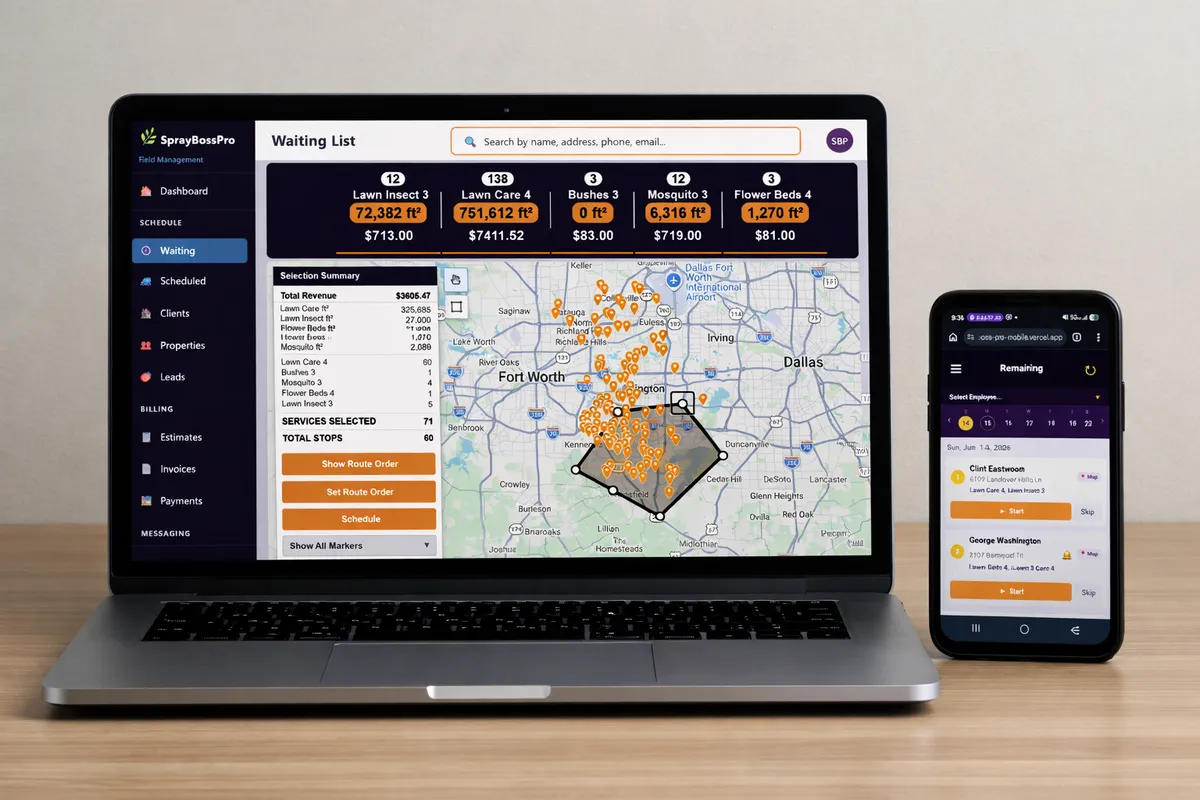
Most field service software is built for plumbers and HVAC techs. LandscapeBossPro is built from the ground up for landscaping companies — install, design-build, hardscape, planting, sod, mulch, and recurring maintenance. The way you bid projects, order materials, schedule crews, and bill clients is completely different, and your software should be too.
from $59/month sounds modest. But what you're getting isn't modest at all. LandscapeBossPro is built to the same standard as software that costs 10 times more — the difference is we built it ourselves, for ourselves, and we don't have a sales team, investor overhead, or a $500/month add-on for every feature you actually need.
Build detailed bids with labor, materials, and equipment broken out line by line. Plants, sod, mulch, pavers, base rock — price every product from your catalog, email the proposal, and let clients accept with one click. No other landscaping software makes bidding this fast.
Track every product you install — plants, sod, mulch, stone, pavers, edging, soil — with unit costs, supplier info, and quantities pulled straight onto your estimates and job sheets. Know your material cost on every project before the first crew shows up.
Two-way SMS inbox, 10+ automated alert types, estimate follow-up sequences, payment reminders, review requests — all built in at the flat price. No Twilio account, no Mailchimp, no third-party setup.
Cards on file, deposit invoicing, progress billing, charge after completion, payment tracking, overdue reports — the full Stripe integration is wired in. Collect deposits before you order materials and see every dollar in one place.
Owner, Manager, Office Staff, Crew Lead, and Mobile-only roles. Granular permission control so your field crews only see what they need and your office manager can't accidentally delete a client record.
Your crews get a mobile-optimized dashboard with their jobs for the day. Complete, skip, reschedule, log materials used, and add notes — all from the truck without calling the office once.
Lasso is the fastest way to dispatch a landscaping crew we've ever seen. Draw a circle on your service-area map and LandscapeBossPro instantly surfaces every property inside that radius with work due — install jobs, maintenance stops, and project visits — with stops, job type, and revenue all calculated in real time before you commit a single crew to a single day.
Most powerful software is complicated. LandscapeBossPro is the exception. Every screen was designed by people who ran landscaping crews — not UX designers who've never loaded a pallet of sod or set a paver. Your team will be using it confidently on day one.
Add your services and product catalog, import your clients and properties, set up your automated alerts, and connect Stripe — most owners are fully operational the same day they sign up. No implementation consultant, no onboarding call, no 90-day setup timeline.
Estimates, scheduling, dispatch, the job board, and the map are all connected. You're not jumping between five different modules or browser tabs. Pull up the dispatch board and everything you need for the day is right there in a single view.
The mobile app your crews use shows them exactly what they need and nothing they don't. Their jobs for the day, the property info, the materials list, the job notes, and the complete button. No training videos, no IT ticket, no frustrated crew members.
Set up your SMS alerts, estimate follow-ups, and payment reminders once. After that, LandscapeBossPro handles every notification, every follow-up, and every review request automatically — whether you're on a job site, at home, or on vacation.
Landscaping is not plumbing. You're not sending one tech to one job for two hours. You're bidding multi-day install projects, ordering pallets of sod and yards of mulch, scheduling crews across job sites, and running recurring maintenance routes that never stop growing.
When we were running our own landscaping crews, we tried every piece of software out there. The big names, the small names, the ones built for "field service." None of them understood what it meant to bid a $40,000 design-build project line by line, order the materials, schedule three crews around it, and still keep the weekly maintenance route running on time.
They don't have that. Because they weren't built by someone who runs a landscaping business. We were. We've been in this industry since 2006, and LandscapeBossPro is the software we always wished existed.
Every feature in LandscapeBossPro exists because we needed it on a real landscaping job. Not because a product manager in a tech office decided it sounded good.
Every tool in LandscapeBossPro was built with landscaping workflows in mind — not adapted from a plumbing app and called good enough.
Build a landscaping estimate in minutes with labor, materials, and equipment broken out line by line. Pull plants, sod, mulch, pavers, and stone straight from your product catalog, email it from the platform, and let clients accept with one click.
Keep a full catalog of everything you install — plants, sod, mulch, soil, stone, pavers, edging — with unit costs and supplier info. Quantities flow onto estimates and crew job sheets so you know material cost on every project.
Schedule multi-day install and design-build projects right alongside recurring maintenance visits. See the whole calendar at a glance and know exactly which crew is on which job site every day.
See every scheduled job pinned on an interactive map. Drag to reorder stops, build tight geographic routes for maintenance crews, and cut drive time before anyone leaves the yard.
A single board shows every job waiting to be scheduled and everything booked for the day. Filter by job type, crew, or date and dispatch directly from the board in one click.
Assign jobs to crews and trucks, sequence the route, and send the day's run to every crew lead's phone. No more morning huddles trying to remember who goes where.
Automatically text customers when a job is scheduled, when your crew is on the way, and when the work is done. Set it once — LandscapeBossPro handles the communication for every single job.
Collect a deposit before you order materials, store cards on file via Stripe, and charge the balance on completion. Progress-bill large projects and track every payment in one place.
Set up weekly, biweekly, or monthly maintenance plans, assign clients to them, and let LandscapeBossPro auto-generate the visits. Renewal dates tracked so nothing falls through the cracks.
Your crews get a mobile-optimized view of their jobs for the day. Mark jobs complete, log materials used, skip, or reschedule — right from the truck without calling the office.
Every property has its own record — service history, project files, materials installed, notes, GPS coordinates, and photos. Everything tied to the address, not just the customer.
Send and receive text messages with customers directly inside LandscapeBossPro. Full conversation history organized by contact — no more switching to your personal phone.
After every completed job, LandscapeBossPro automatically sends a Google review request to the customer — on your schedule, every time, without you lifting a finger.
3 automated follow-up texts go out if a client doesn't respond to your proposal. Let LandscapeBossPro chase the bid so you don't have to.
Unpaid invoices trigger 3 automated payment reminder texts. Collect what you're owed without making uncomfortable calls.
Manage existing clients and active prospects side by side. Track estimates, project history, and notes all tied to each contact — with a full searchable database.
Convert accepted estimates to invoices instantly. Filter by unpaid, partial, paid, or overdue. Every dollar tracked with full payment history, method, and date.
Apply percentage or fixed-dollar discounts to any estimate. Set sales tax rates by jurisdiction and let LandscapeBossPro calculate and track tax on every invoice automatically.
Owner, Manager, Office, Crew Lead, and Mobile roles. Control exactly what each person on your team can see and do — from full access down to field-only.
Create truck profiles, assign vehicles to crews and jobs, and track which truck handled each job. Know exactly what's on every truck every day.
Track crew hours per job and generate payroll-ready reports. Know exactly what you owe before payday and what each project really cost in labor.
Custom stat cards on your dashboard show today's revenue, jobs completed, properties served, money owed, and more — all at a glance the moment you log in.
Job scheduled, completed, skipped, rescheduled, estimate sent, estimate accepted, review request, payment declined, inbound text — all automated, all customizable.
No caps on clients, properties, leads, or users — and no per-seat fees. Whether you have 50 accounts or 5,000, LandscapeBossPro handles it all at the same flat from $59/month rate.
This is where landscaping software lives or dies. LandscapeBossPro's job board doesn't just show you what properties need work — it shows you every install project, hardscape job, and recurring maintenance visit grouped by type so you know exactly how to load each crew's day before you start making calls. New to scheduling software? Start with our first walkthrough, How to Set Up Landscape Scheduling Software in Your First Week.
Every landscaping job is a stack of materials — plants, sod, mulch, soil, stone, pavers, edging. LandscapeBossPro keeps your full product catalog with unit costs so every estimate, every job sheet, and every purchase order is built on real numbers. Know your material cost on a project before you ever break ground.
We were paying $500–$700 a month for software that nickel-and-dimed us. We built LandscapeBossPro to be the pricing we always wished existed.
No contracts. Cancel anytime. No hidden fees — ever.
Yes. LandscapeBossPro handles the full landscaping operation: line-item estimates for install and design-build, materials and product tracking, multi-day project scheduling, crew dispatch, recurring maintenance plans, automated customer SMS, and card-on-file payments. It's built for companies running install crews and maintenance routes, not general service businesses.
Yes. LandscapeBossPro runs multi-day install, hardscape, planting, sod, and mulch projects right alongside weekly maintenance routes from one account. The job board separates them by job type so you can load each crew's day without juggling two systems.
You open the circle-map lasso tool, draw a circle around a geographic area, and every job due inside is selected and added to a crew's route. Stop count and estimated revenue update in real time, and you assign the date, crew, and truck right there. Dispatch that takes 30 minutes in a spreadsheet takes 5 minutes on the map.
Yes. You keep a full catalog of plants, sod, mulch, soil, stone, pavers, and edging with unit costs and supplier info. Quantities flow onto your estimates and crew job sheets, so you see material cost versus price on every project before you break ground.
Yes. LandscapeBossPro replaces spreadsheet estimating, scheduling, route planning, customer tracking, and SMS communication tools in one platform. Most owners are fully operational the same day they sign up — no onboarding consultant, no implementation timeline.
from $59/month, all features included. No hidden fees, no add-ons for SMS or dispatch tools, no setup fees. 14-day free trial with no credit card required.
LandscapeBossPro handles install, design-build, hardscape, planting, sod, mulch, and recurring maintenance — all from one platform — see the full LandscapeBossPro platform overview.
LandscapeBossPro is the only landscape scheduling software built by someone who has actually run install crews and maintenance routes. Try it free for 14 days.