$59/month· 14-Day Free Trial
No credit card required · Cancel anytime · Customer invoicing in CAD built in
Live demo — go ahead, scroll & tap it
my.industrybosspro.com
Spinning up your live demo…

The full software you run everything from — estimates, job scheduling, crew dispatch, billing and more.

🇨🇦 Works in Canada Today

Landscaping Software for Canada —
Invoice Your Customers in Canadian Dollars

LandscapeBossPro runs the whole operation — line-item estimates, crew scheduling and dispatch, maintenance contracts, the crew app, the customer app, and billing — and when you set your country to Canada, every invoice, card charge, and payment link bills in CAD through your own Canadian Stripe account. Not a currency toggle bolted on later. Built in.

Start Your 14-Day Free TrialTry the Live Demo
No credit card required  ·  14-day free trial  ·  from $59/mo after
CAD
Native Customer Invoicing
$59
Flat Monthly — Everything Included
2
Businesses in One: Projects + Maintenance
14
Day Free Trial, No Card

You're Running Two Businesses at Once.
Your Software Should Know That.

Every Canadian landscaping company is really two companies wearing one logo. There's the project pipeline — design-build, hardscape, sod, planting — crammed into a build season that frost shortens on both ends. And there's the maintenance book — the weekly and monthly contracts that carry steady revenue through the whole year. Most software handles one and fumbles the other. LandscapeBossPro runs both from the same board.

The Project Pipeline: A Season That Doesn't Forgive Slow

When the ground finally thaws, every install job you booked all winter wants to start at once — and every week a project overruns is a week you can't get back before the ground closes again. LandscapeBossPro keeps the pipeline visible: which bids are out, which are signed, which builds are active, and which crews they're eating.

  • Line-item bids for hardscape, sod, planting, and design-build work
  • Deposits collected on signing — before you order material
  • Multi-day builds scheduled against real crew capacity
  • Progress billing as phases finish, final invoice at walkthrough
  • Drag-and-drop rescheduling when weather or supply slips a build

The Maintenance Book: The Revenue That Can't Slip

The maintenance book is what pays the bills while the big builds run long — but only if the visits actually happen on schedule. Recurring contracts in LandscapeBossPro generate their own visits, drop onto routed days, and flag anything that got skipped, so the steady money stays steady even in the middle of project chaos.

  • Weekly, biweekly, and monthly contracts that schedule themselves
  • Separate maintenance routes so project overruns don't swallow them
  • Missed and skipped visits flagged instead of silently forgotten
  • Recurring billing in CAD — charge the card on file each cycle
  • Renewals tracked so the book grows year over year

Most “Demos” Are a Phone Call.
Ours Is the Actual Software.

With most platforms, “book a demo” means a sales rep, a calendar link, and a pitch deck. At the top of this page is the real product — scroll it, tap it, break nothing. Here's how the whole experience compares.

LandscapeBossProTypical Platform
See the software before talking to salesLive demo on this pageBook a call first
Price published on the websitefrom $59/mo, right here“Contact us”
Customer invoicing in Canadian dollarsNative — your own Canadian StripeVaries / add-on
Every feature at one priceAll includedTiered plans + add-ons
Per-user feesNone — unlimited usersPer seat, per month
Trial without a credit card14 days, no cardCard up front

“Typical platform” describes common industry practice, not any single competitor.

Whoever Gets the Estimate Out First Wins the Spring

Spring in Canada is a quoting avalanche. The snow melts, the phone detonates, and every homeowner who spent March staring at their dead yard wants a number this week. The company that turns a site visit into a signed, deposited job in two days — while the competition is still “getting back to you” — books the season. That's the whole game, and it's what this pipeline is built for.

From Walkthrough to Signed Job in Days, Not Weeks

Build the bid from your own catalog — labour, materials, and markup on every line — email it from the platform, and let the client accept with one click from their phone. The moment it's accepted, it converts to a scheduled job and an invoice without retyping a single line.

  • Line-item estimates from a reusable catalog — your prices, your markup
  • Client-facing accept/decline page — no printing, no scanning
  • Automated follow-up sequences chase the quiet estimates for you
  • Accepted bid converts straight to a scheduled job and invoice
  • Deposit collected on signing, progress draws on big installs, balance at completion
  • Unpaid, partial, paid, and overdue filters so nothing slips the net
Estimate #0113 — Accepted · Billing in CAD
Paver Walkway — 480 ft²CA$6,240.00
Sod — 3,100 ft²CA$2,480.00
Cedar Mulch — 9 yd³ + labourCA$860.00
TotalCA$9,580.00
Deposit on signing
Charged to card on file
CA$2,874 paid
Progress draw — hardscape done
Invoice sent automatically
CA$3,832
Balance at walkthrough
Payment link texted & emailed
CA$2,874
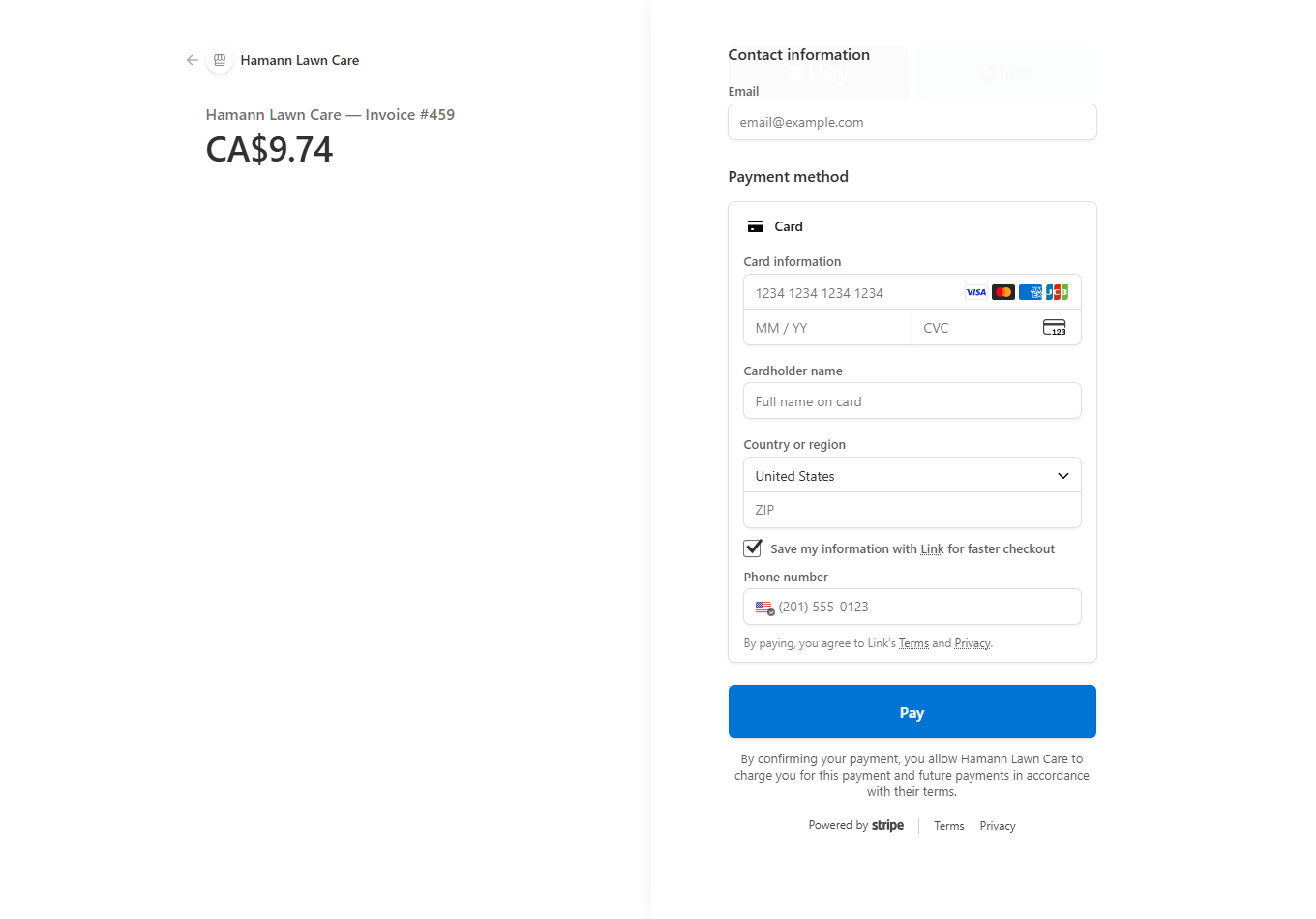
Stripe payment page from LandscapeBossPro showing Hamann Lawn Care — Invoice #459 for CA$9.74, with card fields and a Pay button

A real payment page from the platform — a Canada-set company's customer pays in Canadian dollars. (The founder's own company.) Customers select their own country at checkout.

Project Crews and Maintenance Crews,
Dispatched From One Board

The hardest scheduling problem in landscaping isn't one crew's day — it's keeping the install crews on their multi-day builds while the maintenance crews hit every contracted stop, and reshuffling both when a build runs long or the rain doesn't stop. The dispatch board shows all of it at once: who's where, what's scheduled, what's waiting, and what fits.

  • Job board totals sq ft and service counts before you commit a crew
  • Assign any job to a crew, a date, and a truck in one click
  • Interactive route map with drag-and-drop stop ordering
  • Circle an area on the map and schedule everything inside it at once
  • Weather-day rescheduling without losing the rest of the week
  • Daily material summary — load the truck once, not three times
Dispatch — Tuesday
Crew A — Retaining Wall, Day 3 of 4
Install crew · on site all day
Build
Crew B — 14 maintenance stops
Routed · 9 done, 5 remaining
On Route
Crew C — Sod install + 4 stops
Split day · sod delivery 7:30 AM
Mixed
3 crews · 19 stops · 2 builds
One board. Nothing double-booked, nothing forgotten.

Set the Contract Once.
The Visits Schedule Themselves.

A maintenance book of a hundred contracts is a thousand small promises — and a whiteboard keeps exactly none of them. In LandscapeBossPro, a recurring contract generates its own visits on its own cycle, drops them onto routed days, and bills the card on file when the cycle closes. The book runs whether you're watching it or buried in a build.

  • Weekly, biweekly, and monthly plans with their own service lists
  • Visits auto-generate each cycle — no re-entering the same job forever
  • Recurring billing in CAD against the card on file
  • Renewal reminders so contracts don't quietly lapse over winter
  • Skipped and missed visits surfaced before the customer calls about them
  • Every visit logged against the property — history you can stand behind
Maintenance Book — This Cycle
Weekly Full Maintenance
62 properties · all visits generated
On Track
Biweekly Beds & Pruning
28 properties · next run Thursday
On Track
Monthly Commercial Grounds
2 visits pushed by rain · rescheduled Fri
2 Moved
0 visits silently missed
Anything skipped gets flagged, not forgotten.

The Whole Day, on the Phone That's
Already in the Truck

Your crews don't need another login to a desktop program — they need today's stops, in order, with the details that stop the phone calls: what's being done, what's loaded, the gate code, and the note about the dog. That's the crew app. Big buttons, clear status, built for gloves and truck cabs.

  • Today's jobs in route order, with the map to each stop
  • Scope of work, materials list, and property notes on every job
  • One tap to mark complete, skip, or flag a problem
  • Before-and-after photos captured from the field, tied to the property
  • Crews see only their own day — nothing they can break
  • The office sees progress live instead of calling for updates

Try it yourself — the crew app is the third tab in the live demo at the top of this page.

Crew B — Stop 10 of 14
Maple Crescent — Weekly Maintenance
Mow · trim · blow · gate code 4418
Done
Birchwood Drive — Beds & Pruning
Note: side gate sticks — lift and push
Here Now
Lakeshore Rd — Weekly Maintenance
Customer gets on-the-way alert
Up Next
📸 2 photos added at last stop
Attached to the property record automatically.

Your Customers Get Their Own App —
With Your Company's Name on It

Every client gets a branded app on their phone — no app store, no password to forget, just a secure text-link login. They see their visits, their history, and their invoices, and they pay in Canadian dollars without ever calling your office. You flip a switch to control exactly what each customer can see.

See upcoming visits and full history — what was done, notes, and before/after photos
View and pay invoices from their phone — card on file, one-tap Pay Now, in CAD
Sign up for new services with live pricing figured from their own property
Update their card, reschedule or skip a visit, contact you, or refer a friend
Get alerts their way — email or app notification from day one, text once your Canadian number is registered
Leave a review — or a private “Rate Us” that sends happy customers to Google & Facebook

It's the second tab in the live demo up top — open it and see exactly what your customers would see.

Frost to Frost, the Season Is Short.
The Software Can't Be the Bottleneck.

Between the last frost and the first one, a Canadian landscaping company has to quote, build, maintain, and collect a whole year's revenue. Every part of LandscapeBossPro earns its keep somewhere on that calendar.

🌱

Spring — The Quoting Avalanche

The thaw hits and everyone wants a number at once. Catalog-built estimates go out in minutes, follow-up sequences chase the silent ones automatically, and deposits land the moment a bid is signed — so the season is booked before the competition finishes their callbacks.

☀️

Summer — Builds vs. the Book

Install crews grind through the project backlog while maintenance crews keep a hundred contracts on schedule. The dispatch board balances both, progress invoices go out as phases finish, and the recurring billing runs itself in the background.

🍁

Fall — The Season-End Push

Fall cleanups stack on top of the last installs racing the frost. Circle a neighbourhood on the map, schedule every cleanup inside it at once, and get final invoices out while the trucks are still warm — not in January.

❄️

Winter — Set Up the Next One

Renew the maintenance book, chase the last receivables with automated reminders, and price next spring's catalog while the equipment is in the shop. Your customer records, property notes, and history are all there waiting for the thaw.

Every Property's Whole Story,
One Screen Deep

The client who calls in April about “the same as last year” shouldn't send you digging through old texts and a glovebox of paper. Every client and every property in LandscapeBossPro carries its own record — services, prices, notes, photos, invoices — so anyone in the office can answer like they've been on that lawn for years.

  • Clients and leads side by side, each property with its own profile
  • Service history with dates, crews, photos, and what was billed
  • Property notes crews actually see — gate codes, dogs, drainage, sprinkler heads
  • Every estimate and invoice tied to the property it belongs to
  • Two-way texting history kept with the customer record once texting is live
Property Profile
Property
42 Birchwood Drive — back gate, code 4418
Active Services
Weekly Maintenance · Biweekly Beds · Fall Cleanup
Crew Note
Sprinkler head by front walk — mow around it
Last Visit
Completed · 2 photos · invoiced CA$95.00
Balance
CA$0.00 — card on file

One Flat Price. Every Feature.
No Per-User Fees.

$59 USD a month buys the whole platform — the same everything-included price whether you run one crew in Kelowna or five across the GTA. Your subscription bills in US dollars and your bank converts it; everything your customers pay flows in Canadian dollars through your own Canadian Stripe account.

No contracts. Cancel anytime. No credit card required for the trial.

Canada FAQ — Including the Honest Parts

Two of these answers are things most software websites would bury. We'd rather you know before your trial than after.

Does LandscapeBossPro invoice my customers in Canadian dollars?

Yes — natively, not through a workaround. Set your country to Canada in Company Info and connect your own Canadian Stripe account. From that point on, every invoice you send, every card you charge, and every payment link your customers open bills in CAD. The money lands in your Canadian Stripe account and pays out to your Canadian bank like any other Canadian business.

Is my monthly subscription billed in CAD too?

No — being straight with you: the from $59/month subscription itself is billed in US dollars, and your bank or card converts it at its exchange rate. Everything customer-facing — your invoices, your card charges, your payment links — is in Canadian dollars through your own Canadian Stripe account. It is only the software subscription that bills in USD.

Do automated text messages work in Canada?

Yes, with one honest caveat: Canadian carriers require a registered Canadian sending number before automated texting can go live, and we set that registration up with you during onboarding — it is not instant. Email alerts and customer-app notifications work from day one, so your customers still get their on-the-way and job-complete updates while the number registration goes through.

Does the scheduling and routing actually work for Canadian addresses?

Yes. The job board, route map, crew dispatch, property mapping, and customer records all work in Canada today. Your properties pin on the map, your crews get their routed stops on their phones, and your maintenance book generates its recurring visits exactly the way it does for a company in the States.

Can I run deposits and progress billing on install projects?

Yes. Collect a deposit when the estimate is signed — before you order a single pallet or yard of material — then bill progress draws as the project moves and the balance at walkthrough. All of it in CAD through your own Stripe account, all of it tied back to the original estimate so nothing gets missed.

What does it cost, and is there a free trial?

One flat price: $59 USD per month with every feature included — unlimited users, unlimited clients and properties, estimating, scheduling, dispatch, the crew app, the customer app, and invoicing. 500 texts/month (sent and received, US and Canada) are included, then $15 per additional 500. The 14-day free trial requires no credit card, so you can load your real client list and run it before you pay anything.

The Season Is Short.
Stop Spending It on Paperwork.

Load your real client list, build a real estimate, and run a real route during the trial. If it doesn't earn its keep in 14 days, walk away — no card, no charge, no phone call to cancel.

Start Your 14-Day Free Trial
No credit card required  ·  14-day free trial  ·  from $59/mo after